



Finding a home in the UAE means making one of the most significant decisions of your life, and doing your research is a big part of making it right. Agent listings cover the property details, but they rarely tell you what it is actually like to live in the area.
For that, you would normally have to dig through forums, social media threads, and word-of-mouth to piece together a picture. Community Reviews, Property Finder’s new feature, changes that. Real residents share their honest experiences and rate the area across specific categories, giving you a clearer picture of what life in the area is like before you rent or buy.

Area reviews on Property Finder are submitted by real users, not agents or developers. They are non-commercial and independently moderated. You can also toggle to read reviews about a specific tower, giving you a full picture of what it’s like to live in a place. Learn more in this guide about Community Reviews, where to find them on the platform, and how to submit your own review.

Where to find Community Reviews on Property Finder
Community reviews appear in three places across the platform, each designed to meet you where you are already doing your research.
1. Area Insights pages
On any Area Insights page, select the Reviews tab to find community reviews for that area. To see it in action, visit the community reviews for Dubai Marina and explore how residents rate the neighbourhood across different categories.
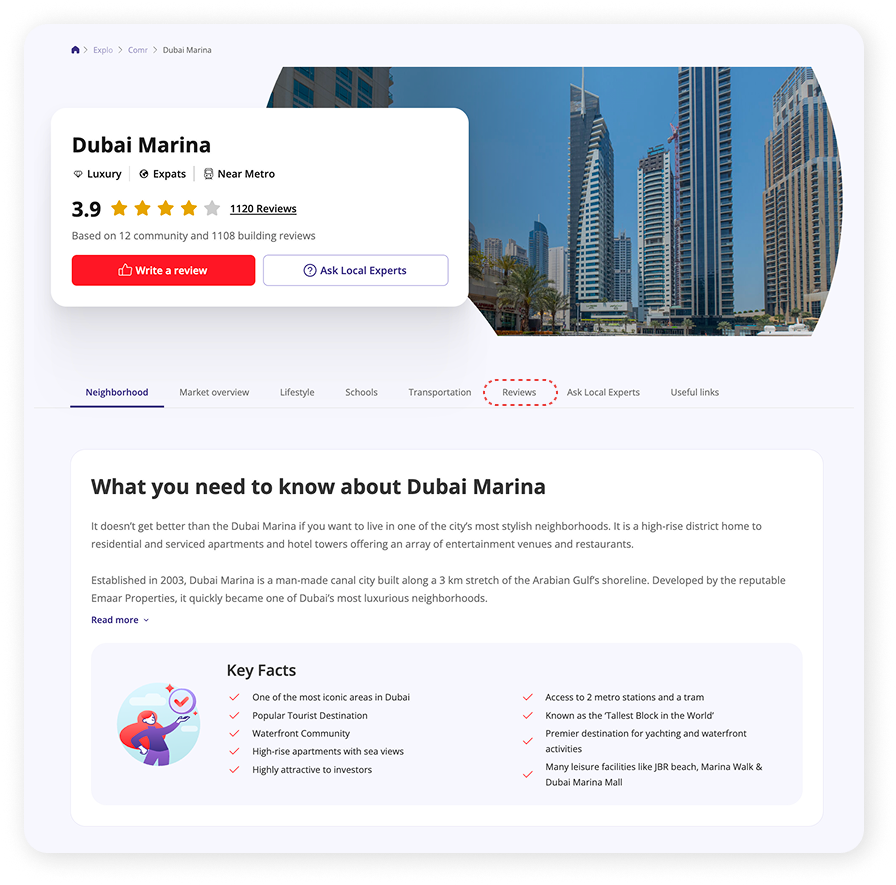
Area Insights pages give you a holistic view of a community, covering everything from property prices and transportation to nearby activities. Property Finder recently revamped this section to pull richer data directly from the market, including proprietary demand and supply signals. A new map view also lets you see all amenities in an area.


2. Property listing pages
When you open a specific listing and are deciding whether the property and the area are right for you, Community Reviews appear alongside the listing details. This neighbourhood review context sits at the exact moment of decision, before you have contacted an agent or committed to a viewing.

3. Search results pages
When you are browsing properties in a community, for example, apartments for rent in Dubai Marina, you can now read area ratings before you open a single listing. If a community’s rating or reviews do not match what you are looking for, you can filter it out and move on without having to investigate each property individually. This makes the process of shortlisting areas faster and more informed.

Key features
Score breakdown
Each community receives an overall community rating based on resident submissions. Behind that score is a detailed breakdown across specific categories, so you can see precisely the pros and cons of an area.

The categories rated include:
- Connectivity & Traffic
- Peace & Quiet
- Parks Nearby
- Family Friendly
- Maintenance
- Parking Area
- Amenities
This thorough community rating means you are not relying on a single number. If connectivity is your biggest priority, you can check that score specifically. If you are looking for a quiet family-friendly neighbourhood, you can check those scores directly and compare with other neighborhoods you are considering.
Filtering reviews
You can filter reviews by community or building, and by newest, oldest, highest rating, or lowest rating. Each review also shows the date it was posted, so you can judge how current the feedback is and whether it reflects the neighborhood as it is today rather than as it was a few years ago.

Writing your own review
You can also contribute your own neighborhood review directly on the platform. Submitting a review takes a few minutes and helps other home seekers get an honest picture of what an area is like to live in. The full step-by-step process is covered in the next section.
How to write a community review
Every community review on Property Finder comes from a real user. Adding your own neighbourhood review takes a few simple steps, and it helps other home seekers make better decisions about where to live.
You can start writing a review from different places where Community Reviews appear:
At the top of an area’s page

Further down the area’s page, at the Score Breakdown section

On a property listing page, when you are browsing a specific property
1. Select your background and rate the area.
Look for the “Write a review” button within the reviews section. Then, choose your relationship to the community, for example, as a current resident, former resident, or visitor, and rate it across the relevant categories.

2. Share your honest experience.
Write your opinion in as much detail as you like. There is no minimum or maximum length. The goal is to give future home seekers a genuine, useful picture of what everyday life in the area is like.

3. Submit your review.
Once you are ready, submit your review through the platform. Property Finder will notify you once your review goes live. All reviews are moderated before publishing to ensure quality and authenticity.
See it in action
Key takeaways
- Community reviews on Property Finder are written by real residents, not agents or developers, to give you an honest overview of the area you are considering. Reviews are moderated before going live to ensure they are genuine and unbiased.
- Area reviews are available in three places across the platform: Area Insights pages, property listing pages, and search results pages.
- Each community rating includes a breakdown by category, covering areas such as connectivity, amenities, parking, and family friendliness, so you can assess whether a neighbourhood fits your priorities.
- You can write your own neighbourhood review in three steps, contributing to a resource that helps other home seekers in the UAE find the right place to live.
Frequently Asked Questions
You can find genuine community reviews on Property Finder. Area reviews are available on Area Insights pages, property listing pages, and search results pages. Reviews are submitted by real residents to give you an honest overview of what it is like living in a community you are considering.
The most practical way is to use the Reviews tab on any Property Finder Area Insights page. There you will find an overall area rating, a breakdown of community ratings, and individual reviews from residents.
A community rating on Property Finder breaks down resident feedback into specific categories, including connectivity & traffic, peace & quiet, parks, family friendliness, maintenance, and amenities. Reading individual neighbourhood reviews adds further context about what residents find most and least appealing about the area.
Yes. On Property Finder, you can toggle between community reviews and building reviews on the same page. This way, you can read feedback on a specific tower or development as well as the wider area. This is available on Area Insights pages, property listing pages, and search results pages.
All reviews submitted on Property Finder are moderated before being published. Reviews come from real users and are checked to ensure they meet quality and authenticity standards. Once a review passes moderation, the submitter is notified and the review goes live on the platform.